Trigger Active Event
This scheduled task is used to trigger onMembershipActive event for subscriptions which has Subscription Start Date is a future date. It is needed if you create membership plans with Subscription Start Date Option set to Fixed Date or Determine By Customer by selecting a date from a Date custom field. See Advanced Subscription Start Date for more information.
This should be used to replace the System - Membership Pro Trigger Active Event plugin. Please disable that plugin if you use this scheduled task.
- Go to System -> Plugins, make sure Task - Membership Pro plugin is enabled.
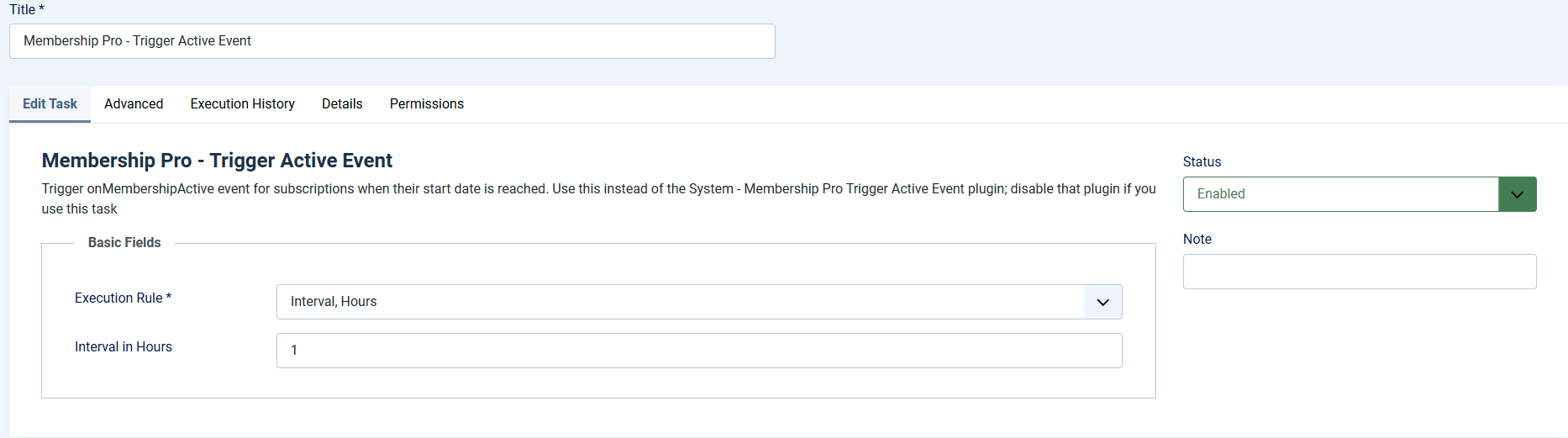
- Go to System -> Scheduled Tasks, press New button in the toolbar to create a new scheduled task for Membership Pro - Trigger Active Event task type.
- Setup all required parameters, save it.
Task Basic Fields
This scheduled task should be run several times per day. Each time it runs, it process 20 subscriptions, so you can setup Basic Fields to following values
- Execution Rule: Set to Interval, Hours
- Interval in Hours: The value of this parameter depends on your estimation about how many subscriptions will be expired per day. Each time the scheduled task run, it will update status of maximum 20 subscriptions. Set this parameter to 1 hour for example, in a day, it will be able to process about 24 x 20 = 480 subscriptions and it will be more than enough. If you have small number of subscriptions expires per day, reduce this to 2, 4 6 or more hours...if needed. In general, set it to 1 or 2 hours would be OK for almost all sites.