Advanced Settings
Use Advanced Settings to configure options for this plan. If you leave these options unset, Membership Pro uses the global settings.
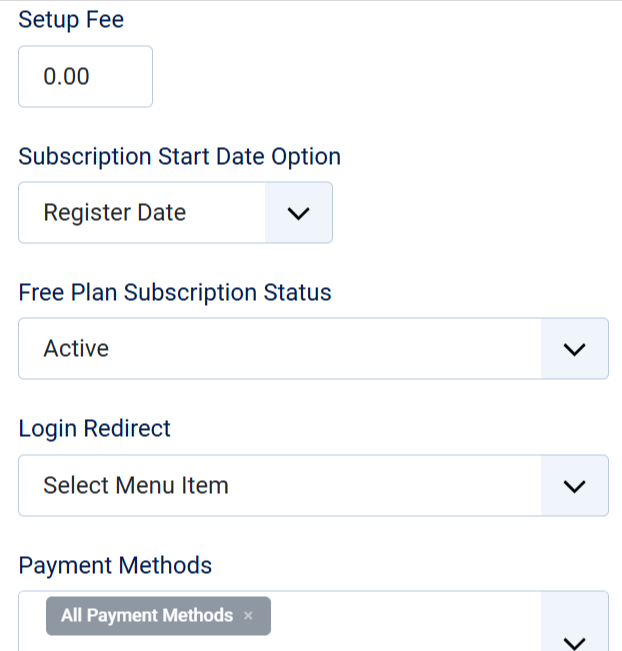
| Property | Description |
|---|---|
| Max number of group members | The maximum number of group members a group administrator can add. Set this option when using Group Membership, which is documented separately. |
| Login Redirect | Select the menu item that subscribers to this plan should be redirected to when they log in. Publish the User - Membership Pro plugin to use this option. |
| Payment Methods | Select the payment plugins available for this plan. If you leave this field blank, all published payment plugins are available. |
| Currency | If you want this plan to use a different currency than other plans - currently only wors with Paypal, you can select the currency you want to use here. If you select currency, please also enter Currency Symbol for this plan, too. |
| Subscription complete url (optional) | By default, subscribers see a page with their subscription details when they complete their subscription. Enter a URL to redirect subscribers to a different page. |
| Notification emails | Enter the email addresses that should receive notifications when someone signs up for this plan. If you leave this field blank, Membership Pro uses the addresses in Configuration. |
| Paypal Email | Enter the PayPal email address that should receive payments for this plan. If you leave it blank, Membership Pro uses the account configured in the PayPal payment plugin. |
| Term and condition article | Select terms and conditions article you want to use for this plan. If you don't select, the terms and conditions article which you select in Configuration will be used |