Square Hosted Checkout
Installation
When you purchase the payment plugin, you will receive a zip file called os_eb_squarehostedcheckout.zip. Go to Membership Pro -> Payment Plugins to install it as any other payment plugin. See https://docs.joomdonation.com/membershippro/basic-setup/payment-plugins#install-new-payment-plugin for installation instructions if needed.
Configuration
- Create a Square APP
- Go to https://developer.squareup.com/console/en/apps
- Create an app if you don't already have one for Membership Pro on your site.
- Select the app to open it.
- Enter necessary payment plugins parameters
Go to Membership Pro -> Payment Plugins, click on os_squarehostedcheckout payment plugin to edit and enter the following parameters:
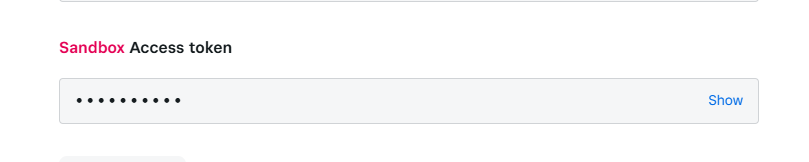
- Access Token: Copy the access token from the app.
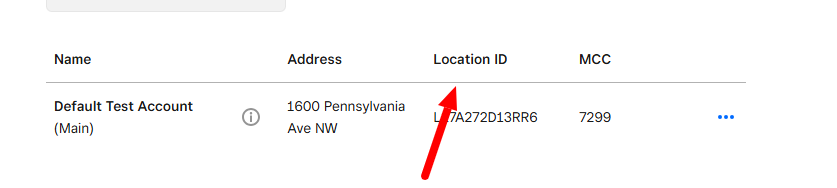
- Location ID: Open Locations in the app's sidebar and copy the location ID.
-
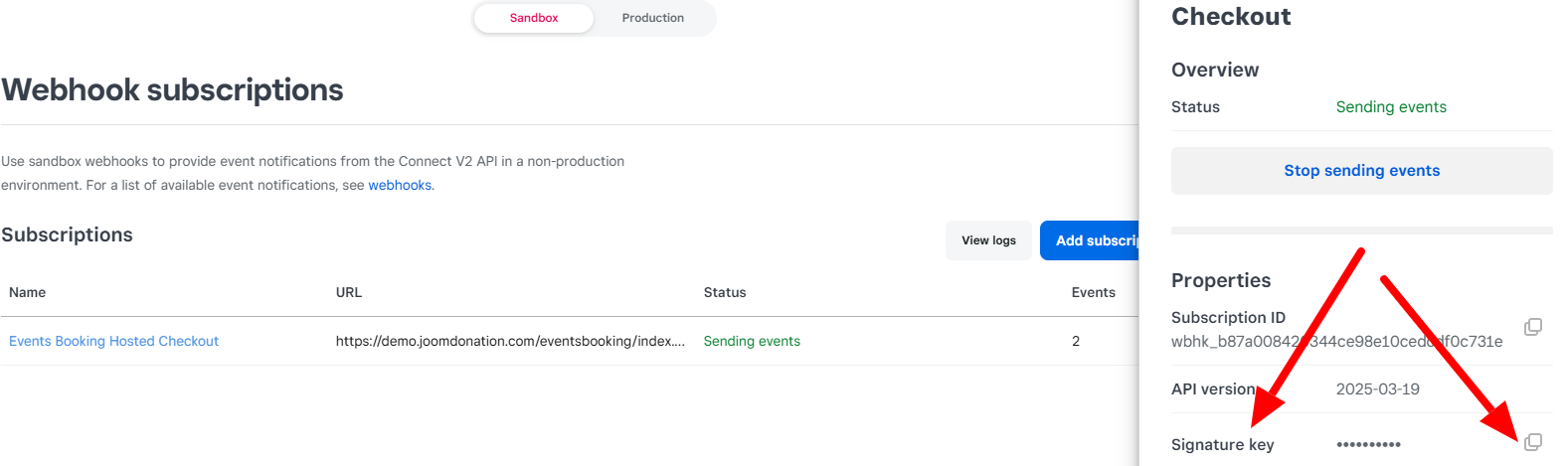
Signature Key: Copy the signature key from the webhook you create in the next step.
-
Order Prefix: This is optional. Enter a prefix if you want the payment note sent to Square to be unique.
- Create Webhook
Inside the app, from left menu, go to Webhooks >> Subscriptions, and add a new webhook subscription
- Webhook URL : https://domain.com/index.php?option=com_osmembership&task=payment_confirm&payment_method=os_squarehostedcheckout
(Of course, need to replace https://domain.com/ with your site url)
- Events: Select payment.created and payment.updated
After creating webhook, get Signature Key of the webhook and enter it into Signature Key parameter of the payment plugin.