Anti Spam Settings
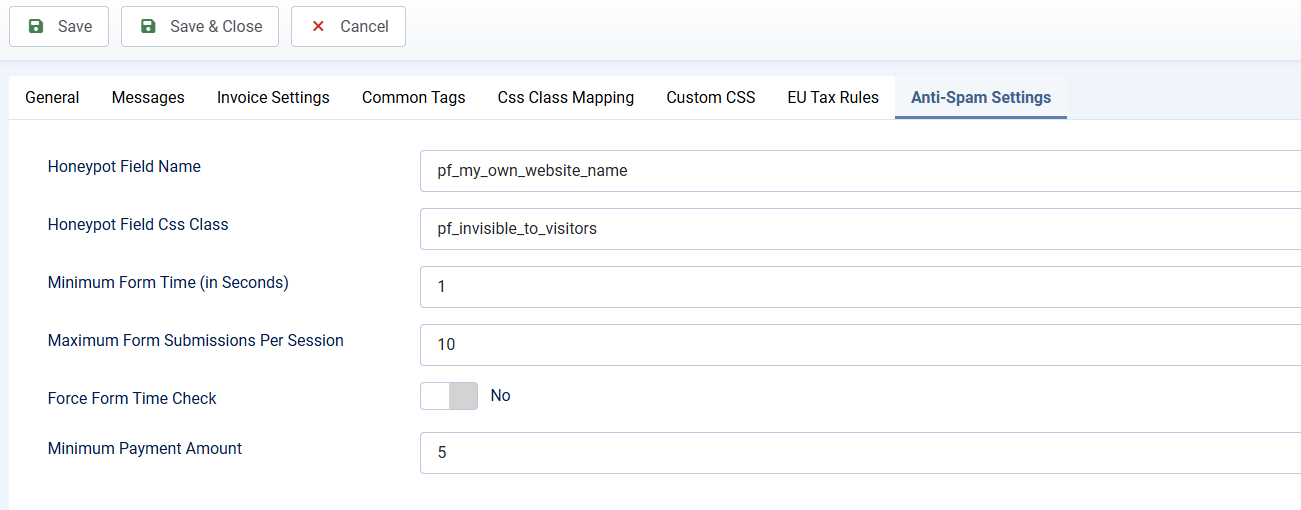
The extension has built-in anti spam system. From configuration page, navigate to Anti-Spam Settings tab to change the default settings if needed to prevent spam
- Honeypot Field Name: This is name of input field which is used to trap spam bots using Honeypot technique
- Honeypot Field Css Class: The css class use for the field above. Better use default value. If you want to change it to use a custom css class like my-custom-css-class, please make sure adding the custom css below to Custom CSS of Payment Form to make sure field is not visible for visitors:
.my-custom-css-class { display: none !important; }
- Minimum Form Time (in Seconds): It takes time for human to complete form inputs before the form is being submitted, but spam bots does not need that time. So you might want to set this config option to 1 or 2 seconds for example to trap bots. Keep in mind that, if users logged in and access to the form, the inputs on the form could be pre-populated from previous submission, so it takes less time, even for real users to submit the form. So if you are unsure, better leave this config option to empty to prevent un-expected behavior
- Maximum Form Submissions Per Session: Real visitors should not submit the same form many times while spam bots will keep submitting (even to 1000 times). So you might want to set this config option to certain value like 10 to prevent submitting form too many times (which should not happens to real users, just spam bots). For example, it could set to 10
- Minimum Payment Amount: Some time, spam bots might use your form to process payment with small payment about. So to prevent that, you can set this config option to certain value to something like 5 and every submissions with payment amount smaller than 5 (only spam bots do that) will be blocked