Delete Old Payments
This scheduled task is used to remove the payment records which are older than certain number of days in case you do not want to keep old data (for example, payment records older than 3 years).
Create and configure the scheduled task
- Go to System -> Plugins, make sure Task - Payment Form plugin is enabled.
- Go to System -> Scheduled Tasks, press New button in the toolbar to create a new scheduled task for Payment Form - Delete Old Payments task type.
- Setup all required parameters, save it.
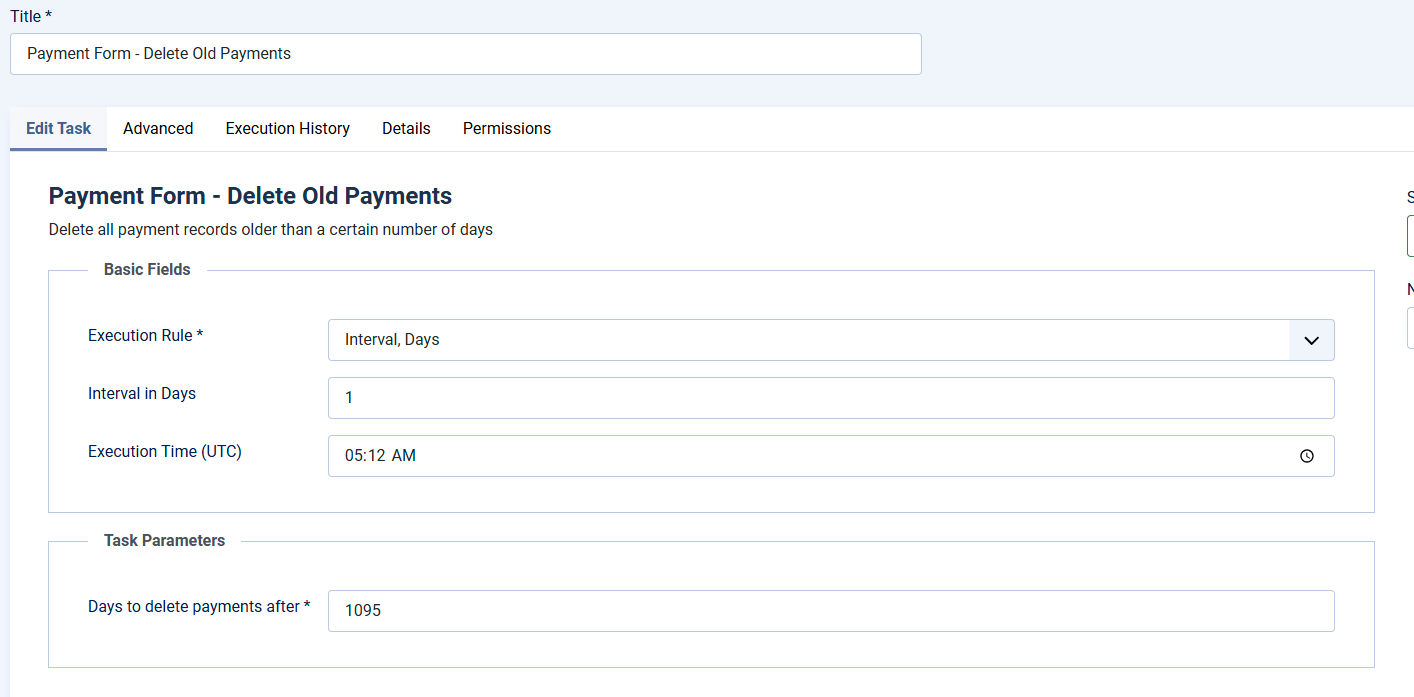
Task Basic Fields
This scheduled task does not need to run so often. It could be run every few days, for example, every 3 days, so you can setup Basic Fields to following values
- Execution Rule: Set to Interval, Days
- Interval in Days: Set to the number you want, for example, if you set it to 3, the task will be run every 3 days.
- Execution Time (UTC): Choose the time you want the task to be executed, for example 10:00
Task Parameters
- Days to delete payments after : Enter number of days into this parameter (for example, 365 days). Then the payment records older than that number of days will be deleted each time the task is executed. Please do not set it to a low number to avoid data lost (we use 1095 as default value for this parameter, mean the task will only delete payment records older than 3 years)