Field Dependencies
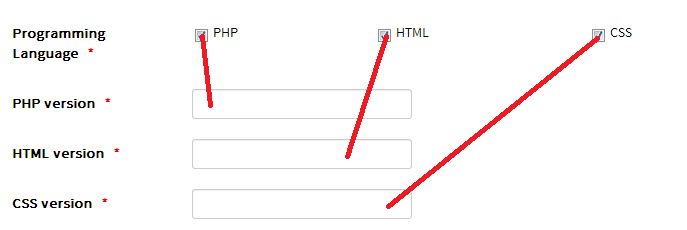
Field dependencies conditionally show additional fields based on a selection in another field. For example, you can ask for a software version only when the payer checks that they use the related programming language.
The field that controls visibility is the master field. It must be a published List, Checkboxes, or Radio field.
- Edit or create the field that should appear conditionally.
- Under Depend On Field, select the master field.
- Under Depend On Options, select the option or options that should make this field visible.
- Save the field and confirm that both fields are assigned to the intended form.
Example: collect versions for selected languages
Create a Checkboxes master field titled Programming Languages, with the options PHP, HTML, and CSS. Then create three Text fields:
| Field | Depend On Field | Depend On Options |
|---|---|---|
| PHP Version | Programming Languages | PHP |
| HTML Version | Programming Languages | HTML |
| CSS Version | Programming Languages | CSS |
On the form, each version field appears when its matching language is selected and is hidden when that option is cleared.