Stripe Checkout
Installation
Extract os_pmf_stripecheckout_unzip_first.zip and install the plugin ZIP from inside it under Payment Form → Payment Plugins.
Configuration
-
Enter your Stripe API keys in the payment plugin settings. Stripe API keys
-
Follow instructions at https://stripe.com/docs/webhooks/setup#add-endpoint-dashboard, add the webhook URL below to your Stripe account:
https://domain.com/index.php?option=com_pmform&task=payment_confirm&payment_method=os_stripecheckout
(Of course, need to replace https://domain.com/ with your website url)
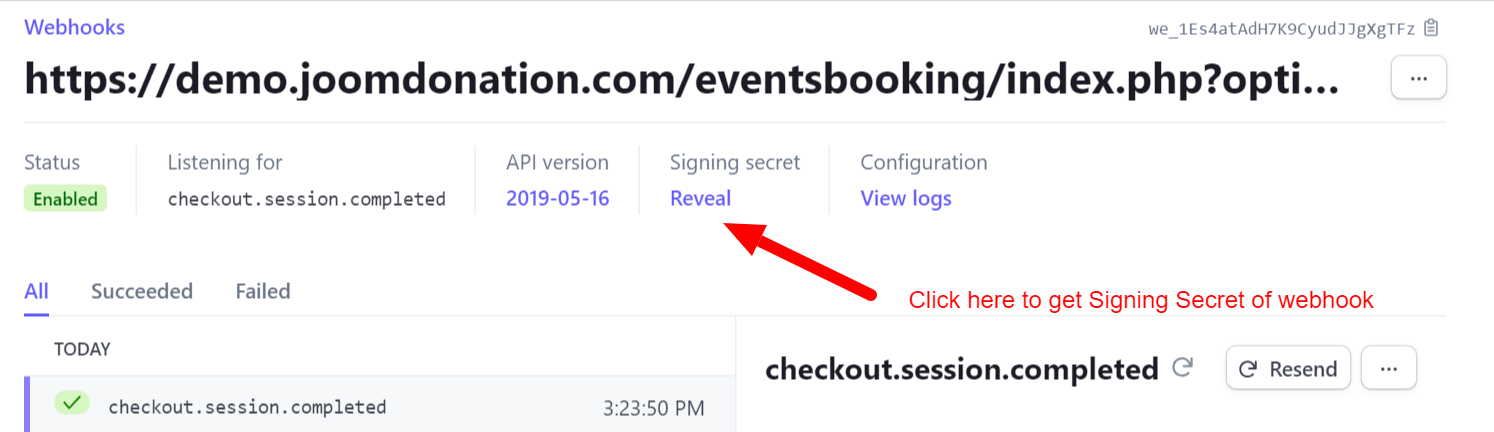
Select the event checkout.session.completed for that webhook URL.
- After setting up webhook, you need to get Signing secret of the webhook URL, and enter it into Signing Secret parameter of the payment plugin. In the webhook URL setting, click on Reveal button to get it (see the below screenshot)