Square Hosted Checkout
Installation
When you purchase the payment plugin, you will receive a zip file called os_eb_squarehostedcheckout.zip. Go to Payment Form -> Payment Plugins to install it as any other payment plugin. See Install Payment Plugin for installation instructions if needed..
Configuration
- Create a Square APP
- Go to https://developer.squareup.com/console/en/apps
- Create an app if you already don't have one for Payment Form use on the website yet
- Click on the app to go inside the app.
- Enter necessary payment plugins parameters
Go to Payment Form -> Payment Plugins, click on os_squarehostedcheckout payment plugin to edit and enter the following parameters:
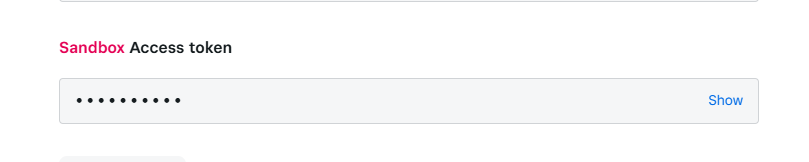
- Access Token: Inside the app, you can easily see and get Access Token
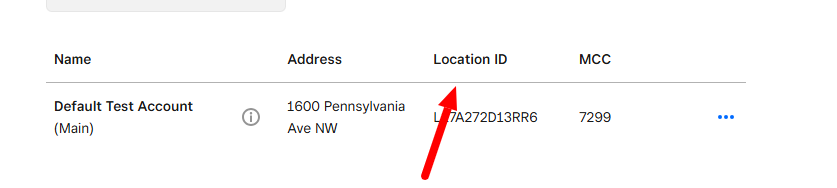
- Location ID: Inside the app, click on Locations link at the left and get Location ID from there
-
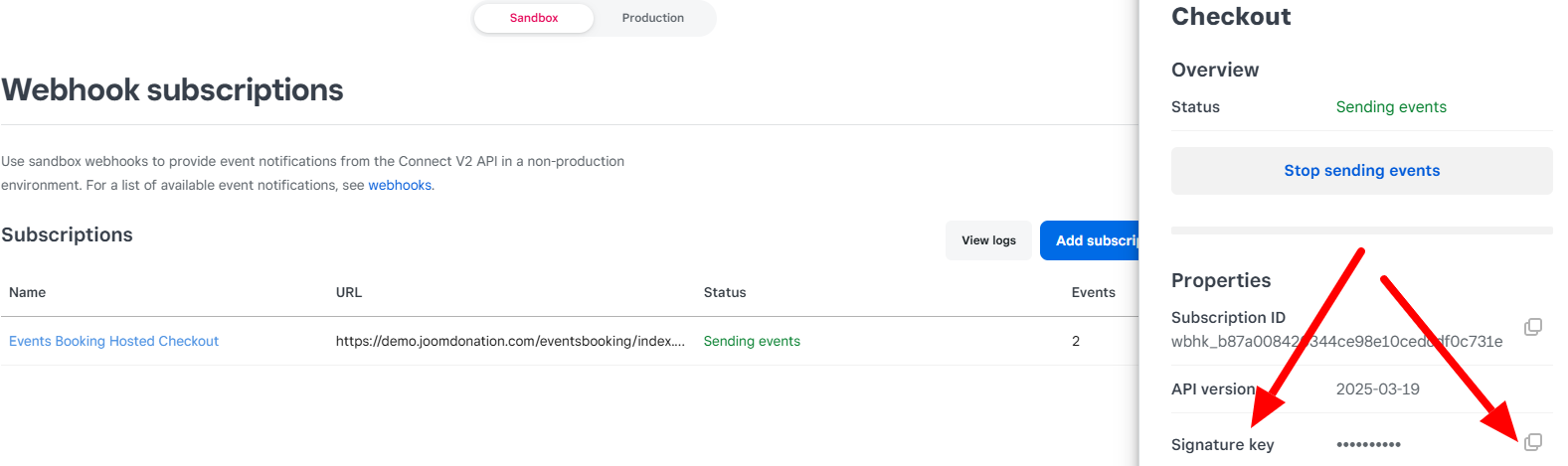
Signature Key: You can get data Signature Key data of the webhook which you create in next step.
-
Order Prefix: This is optional. You might want to enter a prefix for this parameter to make sure payment note passed to Square unique.
- Create Webhook
Inside the app, from left menu, go to Webhooks >> Subscriptions, and add a new webhook subscription
- Webhook URL : https://domain.com/index.php?option=com_pmform&task=payment_confirm&payment_method=os_squarehostedcheckout
(Of course, need to replace https://domain.com/ with your site url)
- Events: Select payment.created and payment.updated
After creating webhook, get Signature Key of the webhook and enter it into Signature Key parameter of the payment plugin.