Validate Field Data - Client Side
Documents Seller uses jQuery Validation Engine to check field values in the customer's browser. If an answer fails a configured rule, checkout displays a message so the customer can correct it.
Set up validation
- In the Joomla administrator, go to Documents Seller → Custom Fields and edit the field.
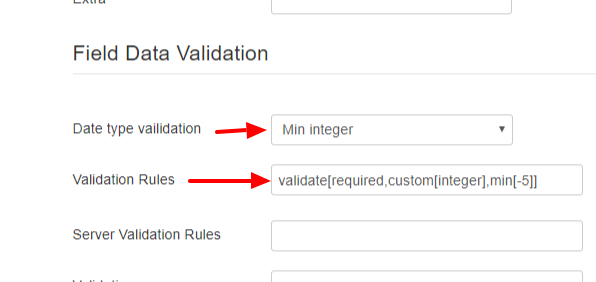
- Set Require to Yes if the customer must answer. For a Text field, choose a preset under Data type validation if you need a specific format, such as Integer Number, Number, or Email.
- Review the generated Validation rules. Some presets start with example limits. For instance, Min integer generates
custom[integer],min[-5]within the rule. Replace-5with the minimum you want. - If you need a custom rule, enter it in Validation rules after choosing Require and Data type validation. The editor regenerates the rules when you open the field or change either setting, so check the rule before saving.
- Click Save & Close, then test checkout with a valid value, an invalid value, and a blank answer.
| Validation rule | What it checks |
|---|---|
validate[required,custom[email]] |
The customer must enter a valid email address. |
validate[required,custom[integer],min[10]] |
The customer must enter a whole number of 10 or more. |
validate[custom[number],min[0]] |
The field is optional. If filled in, it must contain a number of zero or more. |
See the jQuery Validation Engine validators for additional rules.